
 English
 Deutsch
CT-Assist – Use the best of 2 worlds …
With more than 850 functions, CT-Assist, as an add-on to the software technology of SAP SE, provides significant support for IT.
1. Integration of CT-Assist and SAP Application Server
Der CT-Assist als Add-On auf dem Frontend-PC ist integriert mit der Applikationsserver-Technologie der ABAP®-Workbench und verknüpft die Vorteile einer schnellen, innovativen Entwicklungsumgebung auf dem PC mit der bewährten SAP® Software-Technologie.
Zusätzlich können Sie zur Optimierung Ihrer IT-Arbeitsabläufe automatisch Funktionen des ABAP-Editors (SE38) oder der Workbench (SE80) über den CT-Assist fernsteuern. Die Funktionen des CT-Assist stehen Ihnen parallel zu den Funktionen der ABAP-Workbench zur Verfügung.
Der CT-Assist stellt Ihnen durch 9 integrierte Software-Assistenten einen Advisor-Background zur Verfügung, der eine qualifizierte und sichere ABAP-Programmierung sowie Maintenance substantiell unterstützt.
2. Which SAP systems und which releases are supported?
The CT add-on is suitable for the following SAP systems: R/3® (release 3.1x up to 4.7 Enterprise), mySAP™ ERP, mySAP™ CRM, SAP® BW, SAP NetWeaver® (6.20 bis 7.3) as well as all further components which are based on SAP NetWeaver systems.
The use of the CT-Assist is independent of the SAP® release. Even older R/3® releases (like 3.1x) can fully benefit from the code completion functions and ABAP programming assistants of the CT-Assist .
The installation process depends on the release and takes about 5-10 minutes.
Further Information about the system requirements ...3. Integration and control functions of the CT-Assist
The CT-Assist uses a GUI library which can be fully customized. More than 20 GUI elements (edit windows, search boxes, hit windows, trees, popup windows, control elements, etc.) can be indivdually arranged to build your individual development environment.
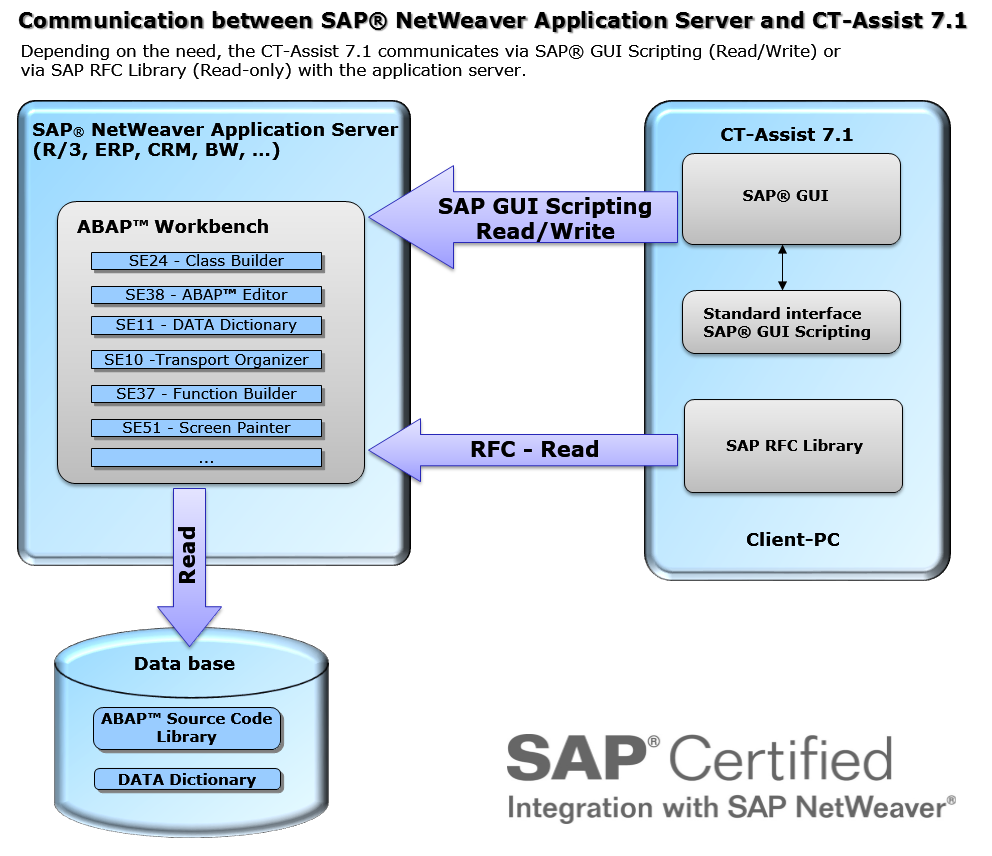
The standard interface SAP® GUI Scripting is used to achieve a tight and safe integration with the ABAP Workbench is realized:
- Safe update of ABAP source code, no direct database access, the ABAP source is saved by the ABAP Workbench
- complete authority check, lock concept, etc.
- completely where used functionality
- integrated use of the transport system
- Direct call of over 40 transactions and reports
- Direct access to the data dictionary
The frequently used ‘double-clicking navigation’ is also available (realized via Remote Function Call [RFC] ). A click within the CT-Assist automatically invokes the corresponding SAP® transaction (e.g. the ABAP dictionary).
3.1 The Use of Certified Software = Secure Applications for Your Company…
The security of your company’s applications is supported by the certification of the CT-AddOn by the manufacturer of the ERP software. This certification confirms that interfaces are used correctly, that add-on functions are relevant to the process, and that technical implementation is correctly done.
SAP SE certified the software solution ‘CT-Assist’ on 28.03.2011. [More information …]
4. The technical realization of the READ/WRITE communication
The CT-Assist can communicate in 2 different modes with the SAP application server.
4.1. Control of update functions (Edit Version)
To ensure a safe ABAP program update on the SAP® application server the ABAP source code is exclusively saved by using SAP® GUI transactions. This is achieved by using the standard interface SAP® GUI Scripting.
Read-only accesses to SAP® application server are realized via the SAP® GUI Scripting interfaces or via an RFC connection (SAP standard interface BC-MID-RFC). Through the RFC connection a function module and several work reports are called to get further information (e.g. where-used lists).
Extended mode diagram of the CT-Assist:
SAP Integration
4.2. The restricted update functionality of the CT-Assist (local mode)
Within the local mode, no CT-work report or no function module will be installed on the SAP application server.
If the use of an editor (e.g. SE38) is restricted in your actual SAP® system (e.g. production system), the CT-Assist can alternatively be used in local mode. The local mode can be chosen as an option during the installation of the CT-Module.
In the local mode the CT-Assist communicates with the application server exclusively (‘Read-only’). If an ABAP® program should be uploaded to the application server, you can use the windows clipboard and the usual upload function.
In the local mode no CT work reports or function modules are installed on the SAP® application server. But you can still benefit from many features of the CT-Assist.