CT-Professional_100 + Help …
The interactive e-Learning system for ABAP™ connects theory with the practical side by way of a realtime coupling to an SAP® system or processing the CT-Debug_Simulator.
The course suite “CT-Professional_100+Help”contains 6 single courses on the subject ABAP programming. Here you get a very detailed description of fre-quent/important language elements.
The ABAP course is for beginner, advanced and retraining users coming from other programming languages like Cobol or Pascal. For each ABAP statement within the course syntax checked executable report examples are available (approx. 600 altogether) . The processing time of the complete course is approx. 150 hours (average learning time).
You learn the theory in short text sections in order then to proceed report examples. You follow the program flow, observe the changes of the variable contents, debug forward and backwards.
1. Real-time connection to the SAP R/3 system …
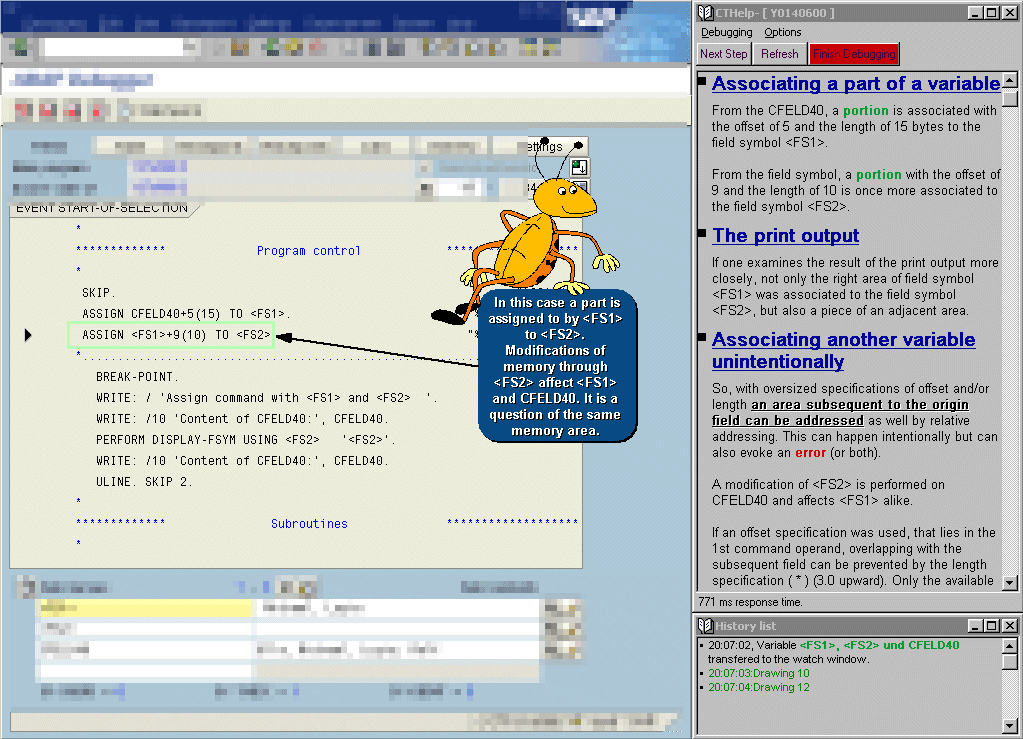
Learn, how the theory is transferred into the practice . The report examples can be loaded live into the R/3® system (see screenshot) and tested in a special guided debugging mode.
Within the R/3 debugger important coding parts are annotateddirectly through overlay drawings and texts.
2. The Debug-Simulator …
Alternatively to the real-time SAP connection you can use the CT Debug_Simulator to simulate the complete program flow. The content of relevant variables can be displayed at every time during the debugging. You can set or change breakpoints interactively or you can use the unique backward debugging feature.
According to our information there is currently no comparable program feature on the market.
3. Course Content
This ABAP e-Learning system contains 6 single courses on the subject ABAP programming. The processing time of the complete course is approx. 150 hours. You can learn intensively the programming language ABAP on different stages. You determine the learning speed and when you want to repeat a learning section …
Course 1: ‘Starting with ABAP – The Basics‘
This course presents a selection of ABAP commands which allow you to program easy reports very soon in the initial learning phase. Within the language ABAP it is sufficient to know only a few commands at the beginning to manage light programming requests.
Course 2: ‘Extension of language range and application’
This course consists of a selection of ABAP™ commands, which allow (together with course 1) you to also program bigger reports of an intermediate level.
Course 3: ‘Further commands for efficient programming’
The course 3 shows you how to work with the extensive “SELECT command group …” in connection with the R/3® database.
Course 4: ‘Field symbols, SELECT clauses and list commands …’
The course 4 focuses among other things on the use of field symbols. Here you will find a powerful feature to work with variables.
Course 5: ‘Additional address commands, bit operations, datasets and external performs …’
Course 5 focuses on external calls and connections of the R/3® system. For example accessing external data on the server and on the client or calling external programs in a static/dynamic way.
Course 6: ‘Special commands …‘
Course 6 contains special ABAP commands and options that should be used in practice, with special care.
4. RETRIEVAL-HELP for the program practise …
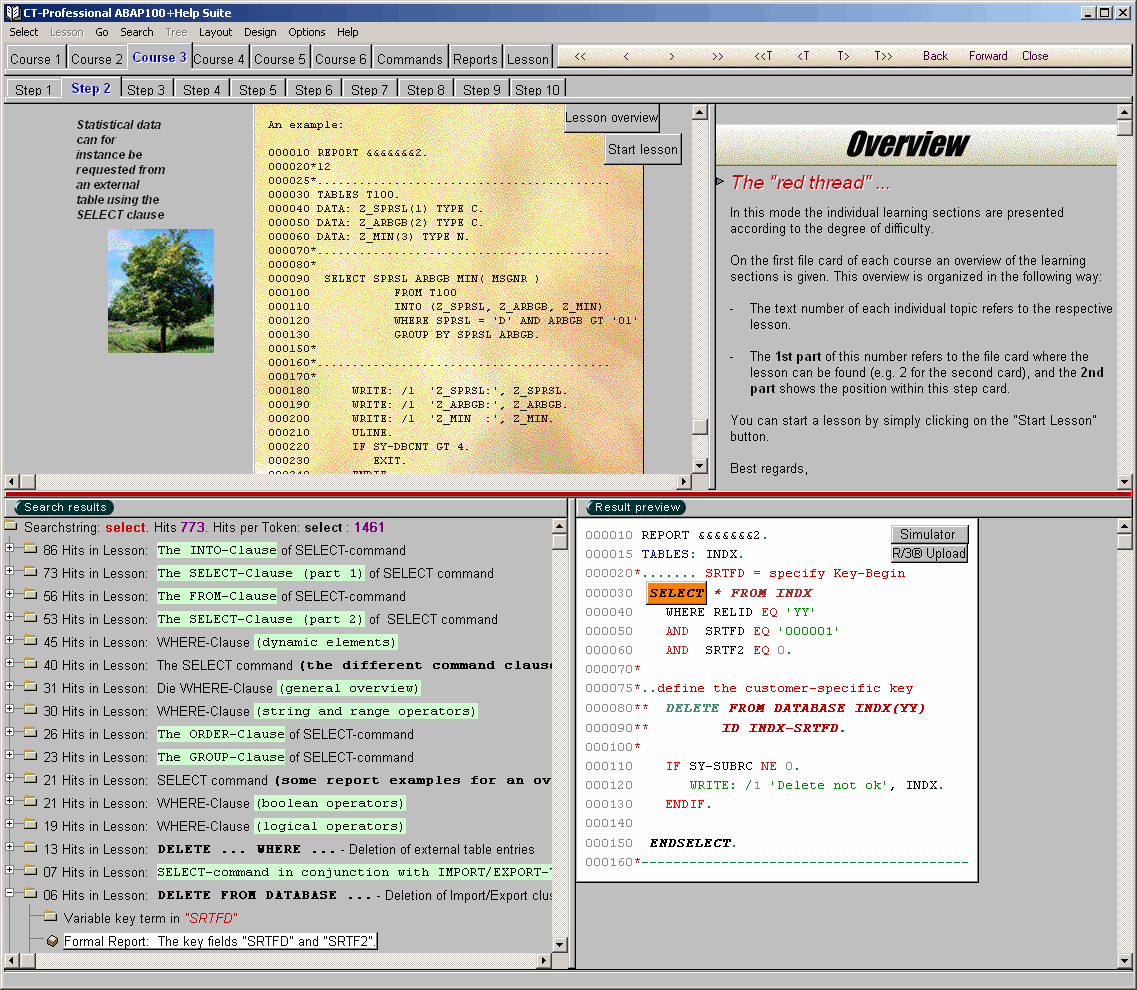
Through different search requests the user will be supported in his daily programming work. The complete course content is available in full text retrieval. Additionally a ‘help button’ will switch to the SAP® system documentation.
The Retrieval Help will find:
- suitable learning sections
- synonym terms
- central commands in report examples
- report examples (over 600 ABAP reports available)
- special key words used in the e-Learning suite
The search hits are directly linked with he respective learning sections / text areas / reports, sample windows, info trees and so forth. You can for example jump to a report example where you get information about the ABAP™ command you are looking for.
4.1 Help features …
- Full-text search
Through search functions (in combination with AND, OR, NOT) specific words of the CT-Professional_100 content are displayed in hit tree lists - Synonym word search
Not immediately known ABAP language elements can also be located by synonym words. - Retrieval in report examples
If the user wants to find reports examples (for his current coding problem) , the retrieval can be narrowed for example only to report examples. The search results are presented hierarchically in a found tree. After reading a short report summary, the user can jump to report. The found hits are marked, the report itself is displayed with syntax highlighting. - Retrieval in special, central report example commands
Each report focus on a different ABAP language aspect. These special keywords, can also be part of a query (which report deals with ASSIGN ?). - Retrieval in learn sections
The complete lesson pool can be queried in full text search, if a learn section was found, the user can go directly to the corresponding lesson. This lesson can now be processed from that point on. - External retrieval in the host documentation for ABAP commands
The external help button will switch to the SAP® system documentation (which was parallel queried in the background).