
 English
 Deutsch
CT-Test & Optimizer …
In future, process analysis of ABAP® programs will be easier, simpler, and more effective …==> Time-consuming program optimization and error correction are a thing of the past …
Use the Program Structure of the ABAP Code in a Meaningful Way …
The high level of modularization within the ABAP programming language (for example, FORM, FUNCTION, METHOD, DYNPRO, MODULE, and CALL SCREEN) makes it easy to follow the processed program flow in detail using trace recordings, for example.
A graphical offline debugger additionally shows you the program flow as a process diagram. You can navigate step-by-step in this visual debugging (forwards, backwards, jump, …). You can even see the content of the variables being processed (see 2.2) for each step.
The structured visual graphical representation of the often extensive trace recordings considerably reduces processing efforts for the following tasks:
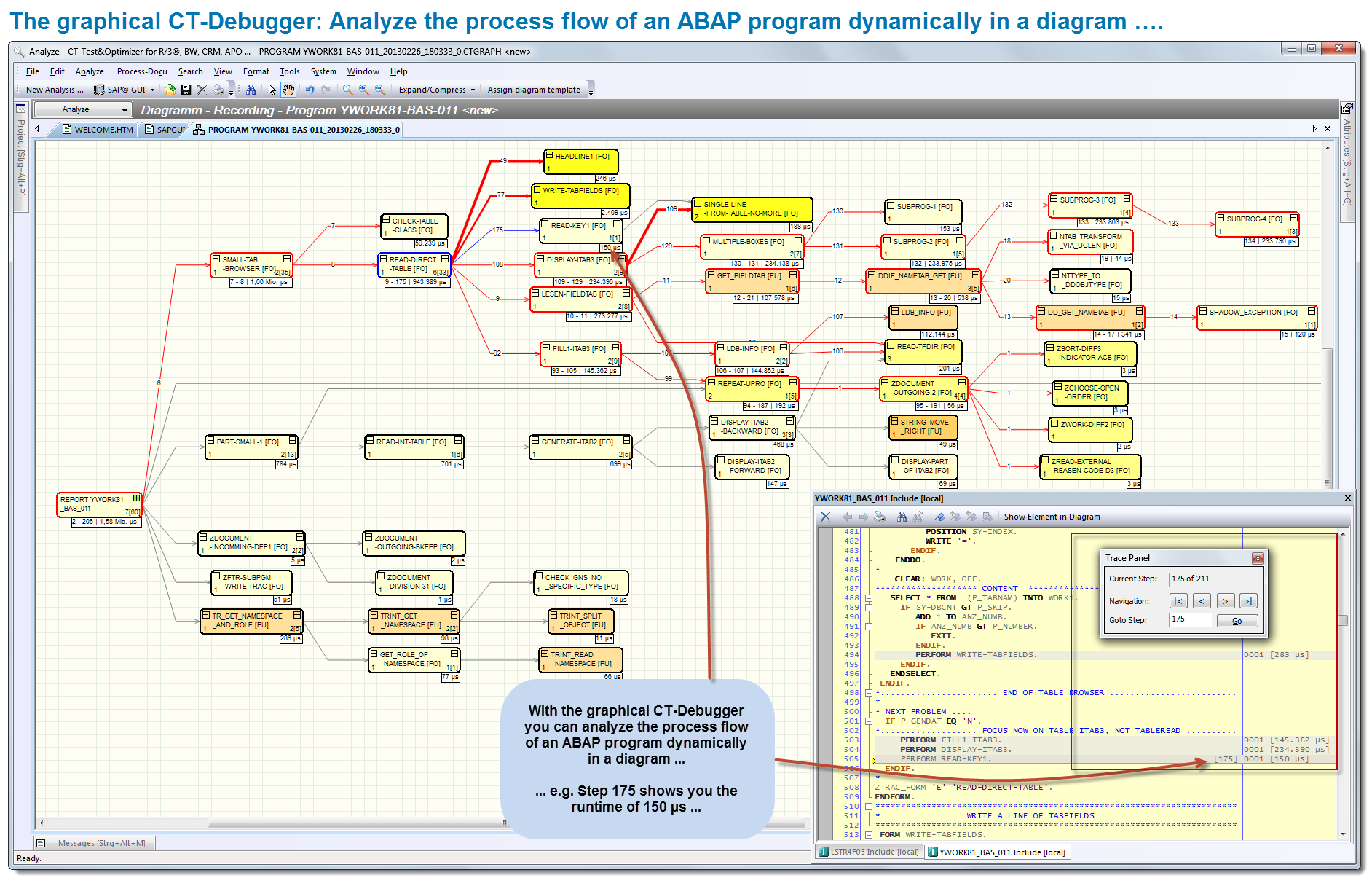
The graphical CT-Debugger: Analyze the process flow of an ABAP program dynamically in a diagram ….
- Program optimization,
- Error correction,
- Quality control,
- Process documentation,
- Maintenance,
- Program checking,
- Documentation analysis,
- IT audits,
- …
The Use of Certified Software = Secure Applications for Your Company…
Knowledge of the technical relationships, e.g. in the Repository, ABAP Dictionary, program/class library and of the base programs and system interfaces forms the basis for the substantive analysis and documentation of ABAP code. The prerequisite for developing our CT products is the considerable know-how and many years of experience (more than 30 years) of our development team.
The security of your company’s applications is supported by the certification of the CT-AddOn by the manufacturer of the ERP software. This certification confirms that interfaces are used correctly, that add-on functions are relevant to the process, and that technical implementation is correctly done. Your add-on product has undergone system integration tests within an ERP environment.
You receive an add-on product for which system integration tests have been carried out within your ERP environment. Certified software products significantly enhance your IT security.
Company compliance rules increasingly require the use of certified software, which has the additional advantage of simplifying regular system checks by internal or external auditing bodies, e.g. government tax audits, external audits, internal audits.

SAP SE certified the CT-Test & Optimizer 25.04.2011 [more …]
Effective Program Analysis with the CT-Test & Optimizer …
1. A Typical Daily Processing Flow in IT …
2. Faster Program Analysis Through the Use of Graphics …
2.1 Program Optimization …
2.2 Program Flow Analysis …
3. Process Documentation for ABAP Programs …
4. More Tools for Analyzing ABAP Code …
5. Which IT Areas Benefit from the Graphical Process Analysis? …
6. SAP Integration …
7. SAP Certification …
8. Software Requirements …
9. Hardware Requirements …
1. A Typical Daily Processing Flow in IT …
Program development
In program development, it makes sense to check the program structure early in the various phases of development (for complexity, performance, use of existing modules, and so on). A graphic representation of the associated program test clearly shows the program flow processed. Further, the graphical trace recording helps to build up the program documentation piece by piece.
Program optimization
The recording of the processed program modules (e.g. transaction SE30) is extensive and has not previously been represented in graphical form. An evaluation of the recording with supporting visualization reduces the complexity of the analysis.
Program flow analysis
Analysis of processed ABAP programs/transactions in the conventional way via online debugging is relatively time-consuming and, as a result, costly. Trace recordings are currently not available within the ABAP Workbench. The exact program flow (e.g. dynamic control) can often be established only through a time-consuming debugging session. Here too, the CT-Test & Optimizer can provide substantial support to your project work.
2. Faster Program Analyses Through the Use of Graphics …
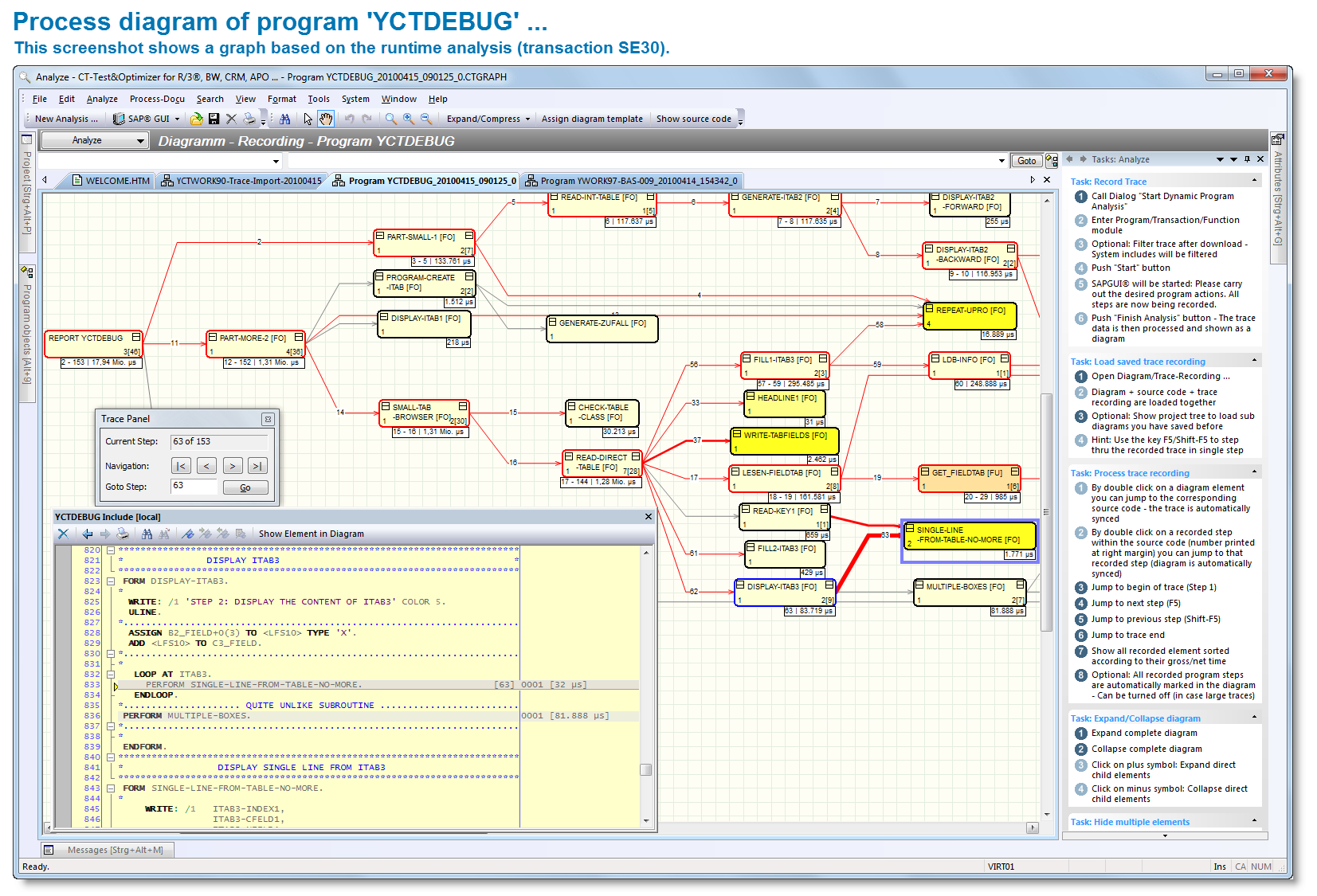
Process diagram of program ‘YCTDEBUG’ …
If, during program optimization, the focus is on the runtime of an ABAP program, it is sufficient to determine the processing times (SE30) of modularization elements (e.g. FORM, FUNCTION, and METHOD).
If detailed program flow analysis is required, however, (e.g. correcting errors, enhancements, or maintenance), a trace recording up to the level of the commands being processed (CT-Trace data pool) makes sense.
The CT-Test & Optimizer uses both the data from the runtime analysis (SE30) and the CT-Trace data pool..
2.1 Program optimization = Data of runtime analysis (transaction SE30) or
2.2 Program flow analysis = CT-Trace data pool (CT-Debug & Trace_Modul).
This control data forms the basis for analysis, routing, and visualization of the program flow. The result is a graphical overview of the processed program elements, contents of the variables, ABAP code, and statistical data.
You recognize the most important processed program events and their interrelationships at a glance (FORM, FUNCTION, METHOD, DYNPRO, MODULE, CALL SCREEN, and so on).
This visual process analysis will make your work easier in future, including detailed work …2.1 Program Optimization
To perform program optimization, you need to import the recorded data with the processed times from runtime analysis (SE30); this import run is supported by the CT-Test & Optimizer.
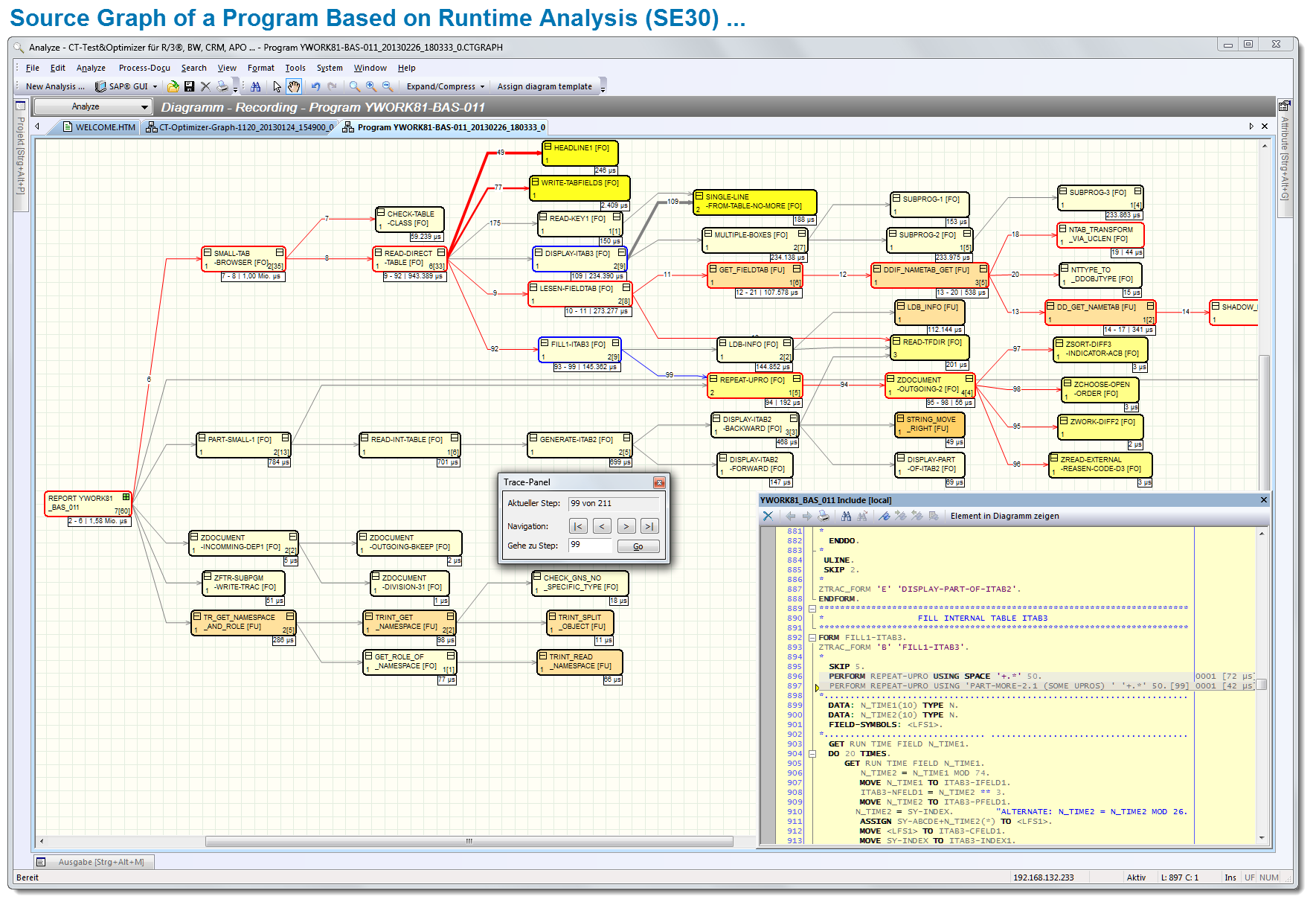
Source Graph of a Program Based on Runtime Analysis (SE30) …
First analysis
The graphical debugger (trace panel) shows you the processed program elements directly step-by-step in the diagram and can be used to do a rough analysis of the program flow. In addition, the relevant source code is shown in a pop-up window with consumption times.
Double-clicking on a graphical element (FORM, FUNCTION, METHOD …) takes you to the relevant process step in the graphical debugger (trace panel).
Within the graphical debugger, you determine how you proceed in your analysis. Use the advantages of free navigation: forwards, backwards, jump …
2.2 Program Flow Analysis
A trace data import from the CT-Debug & Trace module including the contents of variables is required for visual program flow analysis (not included in the delivery scope of the CT-Optimizer).
Detailed analysis
The processed program steps (e.g. ABAP commands, command groups, breakpoint control) are recorded by the CT-Debug & Trace module and stored in the trace data pool. This control data is used for detailed analysis and forms the basis for routing and for the visualization of the processed program flow (trace diagram, ABAP code, list of variables, trace panel).
See the processed program flow at a glance …
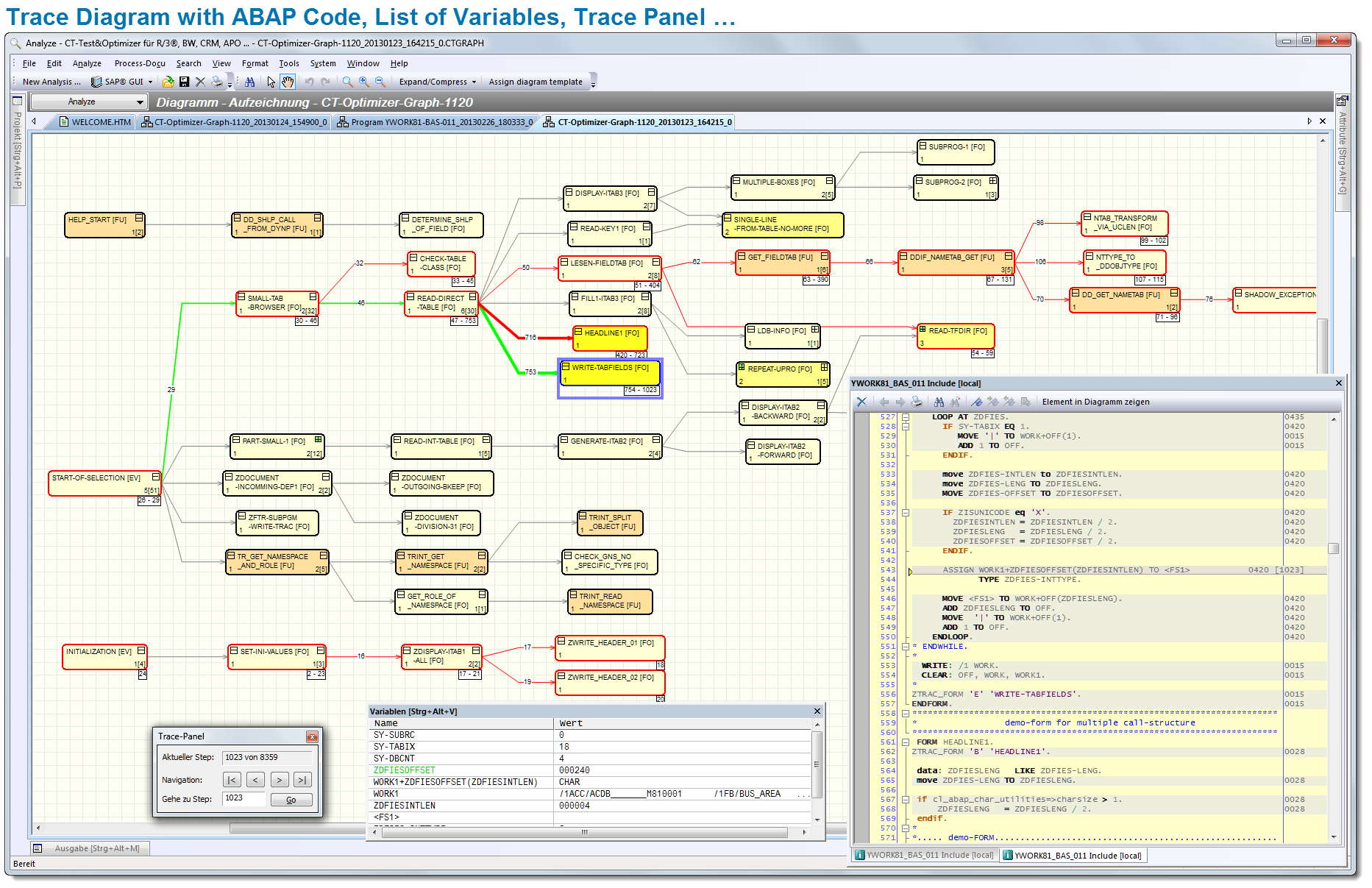
Trace Diagram with ABAP Code, List of Variables, Trace Panel …
Using this graphical representation, you can see the processed program events at a glance (FORM, FUNCTION, METHOD, DYNPRO, MODULE, CALL SCREEN, and so on).
The processed variables and their current contents are shown in a separate window. This means that you can see the contents of the processed variables for each program step and can debug forwards/backwards as required.
You can create process documentation based on the results of your analyses and so can share this information with other team members.
Show the program flow dynamically in a diagram …
The graphical debugger (trace panel) supports you in the subsequent visual process analysis and process documentation. You can display each program step in the trace pool step-by-step. As you do so, the relevant diagram element is selected. In addition, to provide context, the ABAP code is shown at the appropriate processed code position in a pop-up window.
Using another function, you can position on a graph element of your choice (e.g. FORM, FUNCTION, or METHOD) by double-clicking to activate the process step in question in the graphical debugger (trace panel). With the help of the trace panel, you can then continue debugging from this point on: forwards, backwards, jump …
According to the task involved, you can select the method that best suits your purposes.
3. Process Documentation for ABAP Programs …
The usefulness of process documentation for an ABAP Program is frequently underestimated. IT practice shows that many ABAP programs are analyzed and evaluated several times by various developers/consultants (for the purposes of maintenance, error analysis, performance optimization, and so on).
In future, the results of analyses should be documented as soon as possible in a suitable manner in a process description to prevent duplication of efforts:
- Process documentation facilitates later maintenance tasks …
- Changes to programs are also recorded in the process documentation …
- The process description directly links the developer’s know-how to the program code (developer no longer available, the know-how is not lost) …
- The process documentation can be used by others later for reference purposes and so results in considerable synergy benefits …
4. More Tools for Analyzing ABAP Code …
The broad range of functions of the CT-Test & Optimizer will help you to analyze complex programs:
- Reduced complexity through the use of sub-diagrams …
- High-speed forwards/backwards stepping …
- Object tree with detailed information about the program objects used (code, variables, tables, methods) …
- Fast location of successor/predecessor of the current FORM, for example …
- Detailed analysis through a graphical flow-logic display in the pop-up window …
- Select trace steps -> Understand flow processes at a glance …
- Graph elements: Expand. compress, hide , zoom …
- Select and document process chains …
- Object Browser -> Display of all objects -> Additional information …
- Multipage printing of comprehensive process diagrams. You can conveniently print large diagrams across several DIN A4 pages …
- Search functions in the diagram and in source code with hitlist and context information (BEFORE/AFTER search hits) …
- Easier recognition and analysis of USER-Exits …
5. Which IT Areas Benefit from the Graphical Process Analysis?
The graphical representation of processed ABAPTM program events gives a clear overview of the program flow and, thus, considerably supports the following work areas:
- Which coding sections are assigned to which process?
- Are the processed coding sections suitable for the calling process?
- Can the processed program sections provide the required information?
- Has the program been correctly configured?
- Comprehensive documentation of program flows
- Documentation of dynamically called external programs
- Which data is available and when?
- Fast overview of the operation of program sections
- Quality control
- Is there a clear call hierarchy?
- Are certain program events used very frequently?
- Which program parts block subsequent routines?
- Which time-critical program parts negatively impact on which transaction flow?
- Automated documentation of the processed program areas
- Checking of identical program flows at different times
- Automatic registration of process flows before/after maintenance
- Check of program execution before/after changes to programs
- Second-level support
- Training and education
6. SAP®-Integration
Communication between the ‘CT-Test & Optimizer’ and the application server is realized exclusively using certified standard interfaces of the company SAP SE, Walldorf. The CT-Test & Optimizer is suitable for the following SAP® systems: R/3® from Release 3.x to 4.7 inclusive (Enterprise), mySAP™ ERP, mySAP™ CRM, SAP® BW, and all other components that are based on SAP® NetWeaver® systems (up to 7.3).
The add-on has a modern, ergonomic user interface and effective support for tasks. Installation generally takes about 5 minutes.
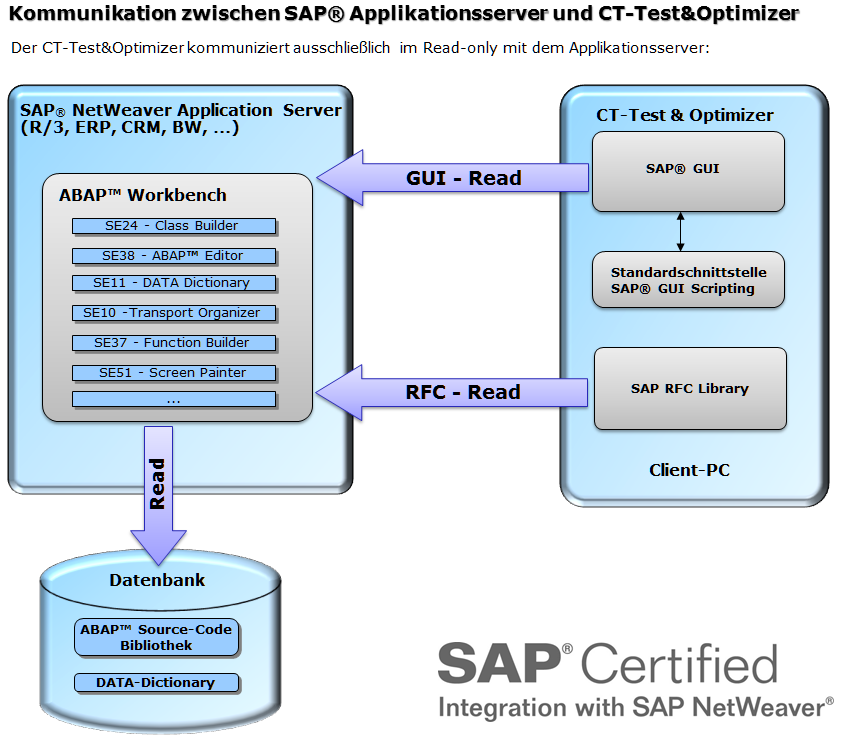
SAP Integration
7. SAP Certification
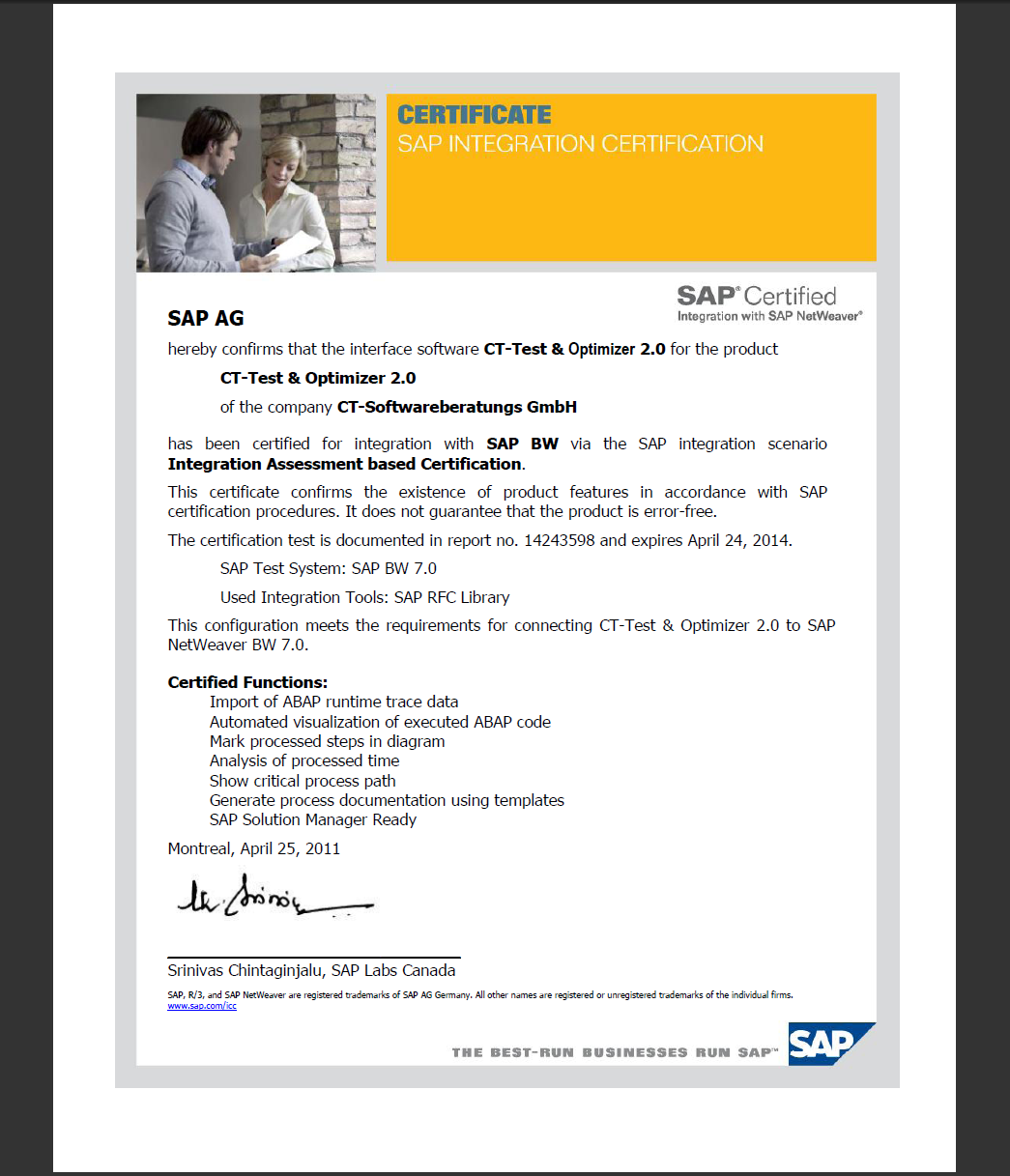
Certificate: CT-Test & Optimizer
SAP SE certified the sofware solution ‘CT-Test & Optimizer’ 25.04.2011.
Certified Functions:
- Import of ABAP runtime trace data
- Automated visualization of executed ABAP code
- Mark processed steps in diagram
- Analysis of processed time
- Show critical process path
- Generate process documentation using templates
- SAP Solution Manager Ready
8. Software requirements
- Operating System, Front-End PC: Windows® NT 4.0 / 2000 / XP® / Vista® / Windows® 7
- SAP® system: SAP® R/3® 3.x to 4.7 (R/3® Enterprise), mySAP™ ERP, SAP Netweaver™ 6.10 to 7.30, SAP® APO, SAP® BW, mySAP™ CRM, as well as all further components which are based on SAP Netweaver™.
- SAP® GUI for Windows® : Current release from 6.203 on
- Standard interfaces: ‘BC-MID-RFC’ (SAP® RFC) and ‘BC-FES-SCR’ (SAP® GUI Scripting, activated profile parameter ‘sapgui/user_scripting’) installed during the SAP® GUI standard installation.
- Activated profile parameter ‘sapgui/user_scripting’ (see SAP® Marketplace: SAP® Note 480149). A detailed tutorial can be found in our help file (Installation guide -> Notes for administrators).
- During the installation an authorization key for the CT-Module has to be entered.
9. Hardware requirements
- Processor: Minimum 500 Mhz
- Main memory: Minimum 256 MB
- Graphics card: 65,000 colors or higher
- Monitor: 17 inches, 1024 x 768 or higher
- Disk memory: approx. 68 MB